
Welcome to Harbor
Shared workspace to make AI agents faster, deterministic, and token-efficient.
Harbor is a shared workspace for AI agents. Connect a service once (Linear, GitHub, Sentry, Notion, your database, …) and any agent on your team can use its tools — with the credentials staying in Harbor, every call traced, and reusable building blocks captured as Skills, Functions, and Apps.
Two ways to run it:
Harbor Cloud
The managed product at tryharbor.ai. Workspaces, billing, hosted MCP server, credential vault. Free Hobby tier — sign up in 60 seconds.
Open Source
@hrbr/client, @hrbr/sdk, Python
harbor-sdk, Local Harbor, and Cliff (the local MCP bridge).
Run the same primitives on your own machine. No hosted service required.
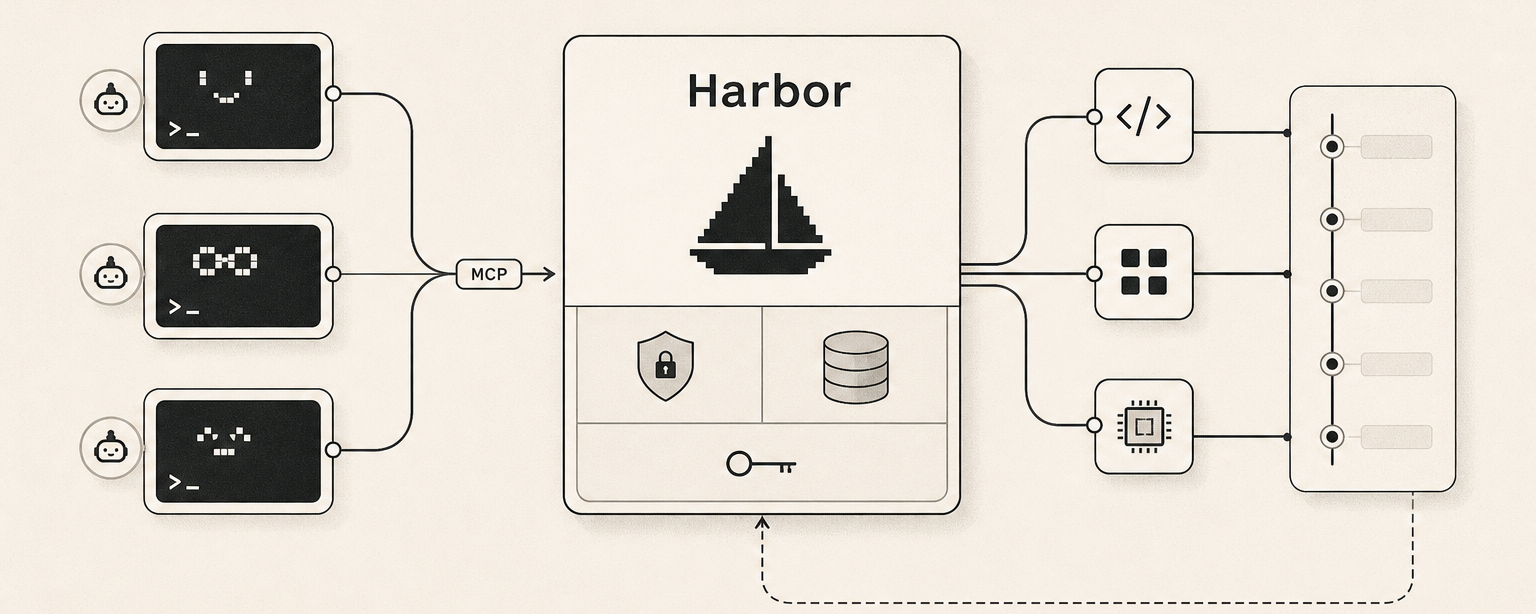
Agents call Harbor over MCP. Harbor routes to connected services, captures every call as a trace, and lets you promote proven scripts into reusable Functions.
What you can do
- Install plugins from a catalog of 143 connected services (or register a custom MCP server) — see the Plugins catalog.
- Run code against those plugins from your agent with
hrbr exec(one-off) orhrbr inspect -f ./thing.job.ts(reusable). - Capture skills — agent-facing markdown that teaches Claude / Cursor / Codex when and how to use a tool.
- Ship small apps — turn a Function into a public URL with one command.
- See everything — every plugin call, every run, every artifact is recorded as a trace your team can replay or audit.
Get going
Quickstart →
Sign up, install the CLI, connect your first plugin, run a tool. 5 minutes.
Why Harbor →
The "without Harbor / with Harbor" comparison.
Architecture →
How the pieces fit together.
Connect an agent →
Point Claude Code, Cursor, Codex, or Gemini CLI at your workspace.
Agents reading this: the canonical entry-point is
/.well-known/agent-skills/harbor/SKILL.md.
It's a single markdown file that teaches you how to authenticate, discover
tools, and invoke them. Start there. Humans should read this page instead.